
Uncategorized

My First Blog Post

“Programming today is a race between software engineers striving to build bigger and better idiot-proof programs, and the Universe trying to produce bigger and better idiots. So far, the Universe is winning.”
― Rick Cook, The Wizardry Compiled

“when you don’t create things, you become defined by your tastes rather than ability. your tastes only narrow & exclude people. so create.”

― Why The Lucky Stiff

Computer programming is the process of designing and building an executable computer program for accomplishing a specific computing task.

At its most basic, computer programming is little more than a set of instructions to facilitate specific actions. Computer programmers create instructions for a computer to act upon by writing and testing code to enable applications and software programs to operate successfully.

Are programming and coding the same thing?Coding means creating codes from one language to another. Programming means to program a machine to perform using a set of instructions. It’s the primary method to facilitate communication between humans and machines. Programming is the formal act of writing code but on a much higher level
Java Documentation

Introduction to Java

HELLO WORLD

Welcome to the world of Java programming!

Programming languages enable humans to write instructions that a computer can perform. With precise instructions, computers coordinate applications and systems that run the modern world.

Sun Microsystems released the Java programming language in 1995. Java is known for being simple, portable, secure, and robust. Though it was released over twenty years ago, Java remains one of the most popular programming languages today.

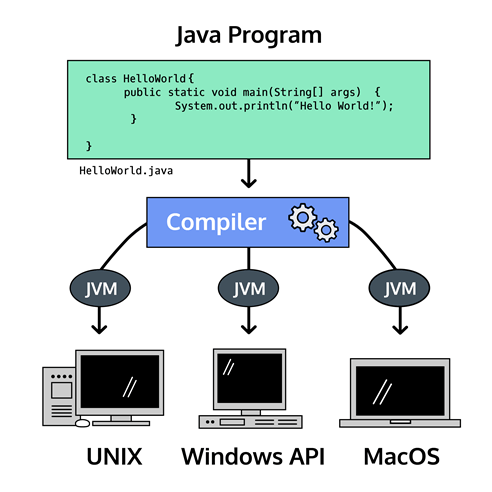
One reason people love Java is the Java Virtual Machine, which ensures the same Java code can be run on different operating systems and platforms. Sun Microsystems’ slogan for Java was “write once, run everywhere”.

Programming languages are composed of syntax, the specific instructions which Java understands. We write syntax in files to create programs, which are executed by the computer to perform the desired task.

Let’s start with the universal greeting for a programming language. We’ll explore the syntax in the next exercise.


  • You’re looking at a computer program written in Java. Run the code in the text editor to see what is printed to the screen.
public class HelloWorld {
  public static void main(String[] args) {
    System.out.println("Hello World!");
  }
}
Java Projects

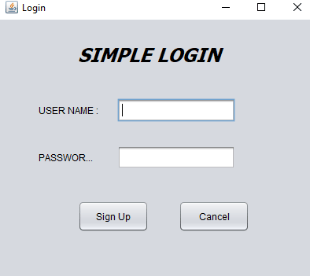
Simple Java Login

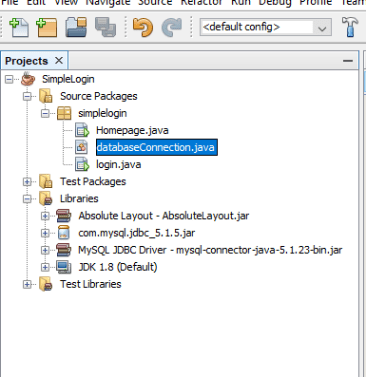
We need below classes

  • databaseConnection.java
  • login.java
  • Homepage.java

databaseConnection.java

package simplelogin;
 
import java.sql.Connection;
import java.sql.DriverManager;
import javax.swing.JOptionPane;
import java.sql.*;
 
public class databaseConnection {
     
   
    final static String JDBC_DRIVER = "com.mysql.jdbc.Driver";
    final static String DB_URL = "jdbc:mysql://localhost:3306/login";
    
    final static String USER = "";
    final static String PASS ="";
     
    public static Connection connection(){
         
        try {
            Class.forName(JDBC_DRIVER);
             
            Connection conn = DriverManager.getConnection(DB_URL, USER, PASS);
            return conn;
        } catch (Exception e) {
            JOptionPane.showMessageDialog(null, e);
        }
            return null;
    }
}
  • Database Name : login
  • Host name : localhost
  • final static String USER = “”; (Insert the username of localhost)
  • final static String PASS =””; (Insert the password of localhost)
  • Download and import mysql jdbc 5.1 5 jar : http://www.java2s.com/Code/Jar/m/Downloadmysqlconnectorjava5115jar.htm
  • Import the MySQL JDBC Driver
  • The MySQL-Java database connection is complete.
Java Projects

Database Connection

Java – MySQL Database Connection

package <1. type your package name>;


import java.sql.Connection;
import java.sql.DriverManager;
import javax.swing.JOptionPane;
import java.sql.*;

public class databaseConnection {
    
  
    final static String JDBC_DRIVER = "com.mysql.jdbc.Driver";
    final static String DB_URL = "jdbc:mysql://localhost:3306/<2. add your database name>;
    
    final static String USER = "<3.username of the server (username of localhost)>";
    final static String PASS ="<4. password of the server>";
    
    public static Connection connection(){
        
        try {
            Class.forName(JDBC_DRIVER);
            
            Connection conn = DriverManager.getConnection(DB_URL, USER, PASS);
            return conn;
        } catch (Exception e) {
            JOptionPane.showMessageDialog(null, e);
        }
            return null;
    }
}

  • First Create the class call “databaseConnection”
  • Then Copy the code
  • Fill the steps 1 to 4
    • <1. type your package name>
    • <2. add your database name>
    • <3.username of the server (username of localhost)>
    • <4. password of the server>

Then we have to add below libraries,